
Argo Blue Green Canary Deployment Platforms: How They Work
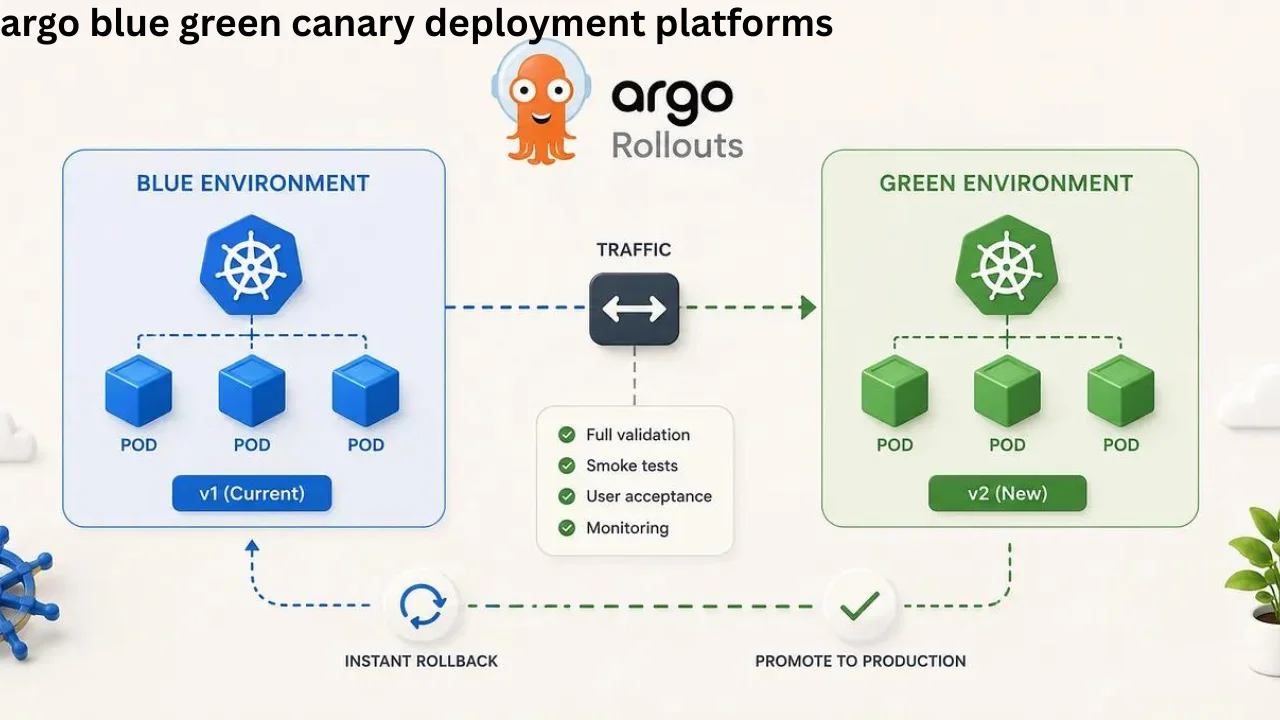
Argo blue green canary deployment platforms help development teams release new application versions with better control and lower risk. Instead of sending every user to a new version at once, teams can test changes, control traffic, watch performance, and move users gradually. Argo Rollouts brings these advanced deployment methods to Kubernetes through a controller and custom resources designed for progressive delivery.
Modern applications often receive updates many times each month or even each day. A small software problem can affect thousands of users when a team releases an update too quickly. Blue-green and canary deployment methods reduce this risk by keeping the stable version available while teams test the new release.
You May Read: what is cashier’s check
What Are Argo Blue Green Canary Deployment Platforms?
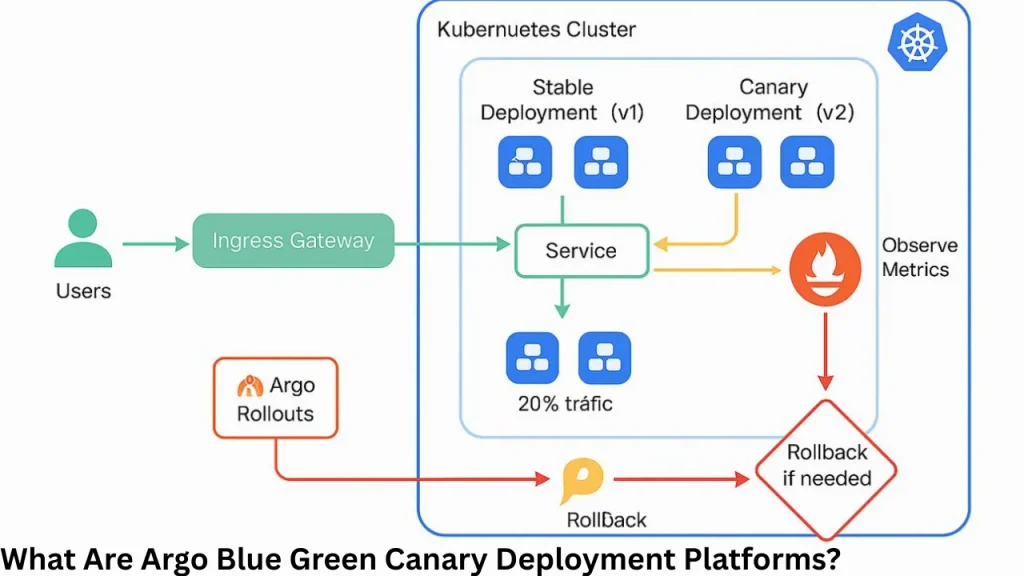
Argo blue green canary deployment platforms are Kubernetes-based tools and workflows that manage application releases through blue-green and canary deployment methods. In the Argo ecosystem, Argo Rollouts is the main tool designed for these advanced deployment patterns.
Argo Rollouts works as a Kubernetes controller with Custom Resource Definitions, often called CRDs. It manages ReplicaSets and controls how an application moves from an older version to a newer one.
The platform supports blue-green deployments, canary deployments, experiments, automated analysis, progressive delivery, traffic management, promotion, and rollback. These tools give DevOps teams more control than a basic Kubernetes rolling update.
Why Modern Kubernetes Teams Need Progressive Delivery
Traditional application deployment often replaces an old version with a new one as quickly as possible. This method can work for small applications, but it becomes risky when an application serves a large number of users.
Kubernetes includes a native RollingUpdate strategy. It provides useful features such as readiness checks and gradual pod replacement, but it does not offer the same level of traffic control and automated analysis as Argo Rollouts.
Progressive delivery changes this process. Instead of treating deployment as one large event, teams release software through controlled stages.
They can first expose the application to internal testers, then a small group of users, and finally the complete audience. If monitoring tools detect problems, the release can stop before the issue affects everyone.
How Argo Rollouts Works
Argo Rollouts works in a similar way to a standard Kubernetes Deployment. It creates, manages, scales, and removes ReplicaSets based on the application configuration.
When developers change the pod template, the controller identifies that a new application version needs to be released. It then creates a new ReplicaSet and follows the deployment strategy defined in the Rollout resource.
The strategy may use blue-green deployment or canary deployment. Once the new version successfully completes the required steps and analysis, Argo Rollouts can mark it as the stable version.
Teams can also pause, promote, abort, or retry a rollout. This control becomes especially useful when developers need to review application behavior before sending all traffic to a new release.
Argo Blue Green Canary Deployment Platforms and Blue-Green Releases
A blue-green deployment runs two application environments or versions at the same time. One version currently handles production traffic, while the second contains the new release.
The active version is often called the stable environment. The second version acts as a preview environment where teams can test the new application before sending real production traffic to it.
Argo Rollouts can use an active service and a preview service for this process. The active service sends users to the stable version, while the preview service gives developers access to the new version for testing.
Once the team confirms that the new version works correctly, Argo can switch the active service to the new ReplicaSet. Users then move to the updated version.
Simple Blue-Green Deployment Flow
| Stage | What Happens |
|---|---|
| Stable release | Current version serves users |
| New release | New version starts separately |
| Preview | Team tests the new application |
| Analysis | Health and performance are checked |
| Promotion | Traffic moves to the new version |
| Cleanup | Old resources can later scale down |
A major benefit of blue-green deployment is fast switching. Since the new application already runs before promotion, teams do not need to build the entire environment after deciding to release it.
How Canary Deployment Works With Argo Rollouts
A canary deployment sends only part of production traffic to the new version. Most users continue using the stable application while a smaller group tests the new release in real conditions.
For example, a company could start by sending 5% of traffic to a new version. If the application performs correctly, the team could increase this amount to 20%, 50%, and eventually 100%.
Argo Rollouts allows teams to define steps that control how a canary release progresses. The process can include traffic percentages, pauses, testing periods, and analysis before moving to the next stage.
This method limits the blast radius of a failed release. If a serious problem appears while only a small percentage of users receive the new version, teams can stop the rollout before the problem reaches the entire user base.
Argo Blue Green Canary Deployment Platforms: Blue-Green vs Canary
Both methods reduce deployment risk, but they manage releases differently.
| Feature | Blue-Green Deployment | Canary Deployment |
| Traffic change | Usually switches between versions | Changes traffic gradually |
| New version | Runs in a preview environment | Receives a portion of live traffic |
| Testing | Often happens before promotion | Happens during live traffic |
| Rollout speed | Can switch quickly | Usually progresses in stages |
| Risk control | Keeps previous version available | Limits users exposed to change |
| Best use | Full environment validation | Gradual production testing |
Blue-green deployment works well when teams need to fully prepare and test a release before switching production traffic.
Canary deployment works well when teams want to measure how a new version performs with real users before completing the rollout.
Neither method is always better. The right choice depends on application size, infrastructure, traffic patterns, risk level, and deployment goals.
Traffic Management in Argo Rollouts
Traffic management plays an important role in progressive delivery. Argo Rollouts can work with traffic routing systems to control which application version receives requests.
The platform can use percentage-based routing. For example, developers can send 10% of traffic to the canary version and 90% to the stable version.
Argo Rollouts can also support more advanced routing options through supported traffic providers. These may include routing based on request headers and traffic mirroring in compatible configurations.
This level of traffic control gives teams a safer way to introduce new software while continuing to serve users from the stable release.
Integration With Ingress Controllers and Service Meshes
Argo Rollouts does not have to manage application traffic alone. It can integrate with ingress controllers and service meshes that already control network traffic inside Kubernetes environments.
Official documentation lists integrations with technologies such as NGINX, AWS Application Load Balancer, Istio, Linkerd, and other supported traffic management systems.
A service mesh can provide fine control over how requests move between the stable and canary versions. This makes percentage-based traffic splitting more accurate than simply changing the number of running pods.
Teams should choose traffic management technology that matches their existing Kubernetes architecture and operational needs.
Automated Analysis and Rollback
One of the strongest features of Argo Rollouts is automated analysis. A deployment does not have to continue simply because the new pods started successfully.
The system can check metrics and key performance indicators before allowing a release to continue. Argo Rollouts supports integrations with several metric providers, including Prometheus and other monitoring systems.
A team might monitor error rates, successful requests, response times, or other business and application metrics.
If the new release performs poorly, the rollout can stop or abort based on configured analysis rules. If the measurements remain healthy, the deployment can continue toward full production.
This automation reduces the need for developers to manually watch every stage of a release.
Argo Rollouts and GitOps
Argo Rollouts fits naturally into GitOps workflows. GitOps treats a Git repository as the source of truth for application and infrastructure configuration.
Teams often use Argo CD to synchronize Kubernetes resources with configuration stored in Git. Argo CD supports Kubernetes continuous delivery and can work with application rollout workflows.
Argo Rollouts then handles advanced release behavior after the new configuration reaches the cluster.
This combination separates two important jobs. Argo CD manages the desired application state, while Argo Rollouts manages how a new version reaches users.
Argo Rollouts vs Standard Kubernetes Deployment
A normal Kubernetes Deployment remains useful for many applications. It supports declarative pod updates, ReplicaSet management, scaling, rollback, and standard rolling updates.
However, larger production systems may need more control during application releases.
| Capability | Kubernetes Deployment | Argo Rollouts |
| Rolling update | Yes | Yes |
| Blue-green strategy | Not built in as a dedicated strategy | Yes |
| Canary steps | Limited/manual setup | Yes |
| Weighted traffic shifting | Requires additional setup | Supported through integrations |
| Automated analysis | Limited | Yes |
| Manual promotion | Basic controls | Yes |
| Progressive delivery | Limited | Designed for it |
| Metric-based decisions | Not built into normal Deployment | Yes |
Kubernetes documentation notes that teams can create separate Deployments when applying a canary pattern. Argo Rollouts provides a dedicated controller that makes advanced canary workflows easier to manage.
Main Benefits of Argo Deployment Platforms
The biggest benefit is release safety. Teams can control how quickly users receive a new application version instead of performing a large update all at once.
Another benefit is better testing. A new version can run next to the stable application while developers perform checks before full promotion.
Argo Rollouts also supports automation. Deployment decisions can depend on monitoring data rather than only manual checks.
Traffic control provides another major advantage. Teams can limit the number of users who interact with a new version while they confirm that it performs correctly.
Finally, automated rollback and promotion features can reduce the time developers spend managing routine deployment steps.
Common Use Cases
Argo Rollouts works well for large web applications, online services, APIs, cloud platforms, SaaS products, and other Kubernetes-based systems that require frequent updates.
Blue-green deployments can help when a company wants to perform final functional testing before exposing a release to production traffic.
Canary deployments are useful when developers want to expose a new feature to a small percentage of real users and measure its performance.
Teams can also use progressive delivery for high-traffic applications where a failed release could affect many customers.
Challenges to Consider
Argo Rollouts provides powerful features, but advanced deployment systems also add complexity.
Teams need to understand Kubernetes Services, ReplicaSets, networking, monitoring, and application health before creating complex rollout rules.
Traffic splitting may also require an ingress controller or service mesh. Organizations should check compatibility before designing their deployment architecture.
Good monitoring is equally important. Automated analysis only works well when teams select meaningful metrics and suitable success or failure limits.
A poorly selected metric could stop a healthy rollout or allow an unhealthy release to continue.
Best Practices for Argo Rollouts
Start with a simple rollout strategy before creating many deployment stages. A small number of clear steps is easier to test and maintain.
Teams should also define reliable application health metrics. Error rate, latency, request success, resource usage, and business KPIs can help show whether a release behaves correctly.
Test rollback behavior before using the workflow for important production systems. Developers should know what will happen when an analysis fails or someone manually aborts a rollout.
Automation should become the long-term goal. Argo’s documentation recommends moving toward automated deployments instead of requiring someone to manually promote or abort every release.
Future of Progressive Delivery in Kubernetes
Cloud-native applications continue to become more complex. Many organizations now run distributed services, containers, APIs, and microservices that receive frequent software updates.
Progressive delivery gives these teams a way to release changes without treating every update as an all-or-nothing event.
Tools such as Argo Rollouts bring traffic control, testing, monitoring, analysis, and rollback decisions into the Kubernetes deployment process.
As Kubernetes environments grow, blue-green and canary methods can become important parts of reliable CI/CD and GitOps pipelines.
Frequently Asked Question
What are Argo blue green canary deployment platforms?
They help Kubernetes teams release software safely using blue-green and canary methods. They also support controlled traffic shifting and rollback.
What is the difference between blue-green and canary deployment?
Blue-green switches traffic between two application versions. Canary deployment moves traffic to the new version gradually.
Does Argo Rollouts work with Kubernetes?
Yes, Argo Rollouts is designed specifically for Kubernetes. It adds advanced deployment and progressive delivery features.
Can Argo Rollouts roll back a failed deployment?
Yes, Argo Rollouts can stop or abort an unhealthy release. Teams can return traffic to the stable application version.
Why use Argo Rollouts for deployments?
It provides better control over software releases and reduces deployment risks. It supports canary, blue-green, traffic management, and analysis.
Conclusion
Safe software releases require more than simply replacing old containers with new ones. Teams need ways to test changes, control production traffic, detect problems, and return to a stable version when necessary.
Argo blue green canary deployment platforms provide these capabilities through Argo Rollouts and its Kubernetes-based progressive delivery model. With blue-green releases, canary traffic shifting, automated analysis, GitOps support, traffic routing, promotion, and rollback controls, teams can release application updates in smaller and safer stages while keeping production systems available.